
Scanbooster Tutorials

Learn ultrasound.
Understand what you see.

Learn sonography by connecting each image to three-dimensional anatomy. Follow the portal vein through the liver, examine the uterus and adnexa, and understand how each probe movement changes your scan plane.

Guided ultrasound tutorials connect video demonstrations with detailed explanations and practice tasks for medical students, sonographers, residents and specialist physicians.

Choose a lesson
Scan plane & anatomyB-MODE
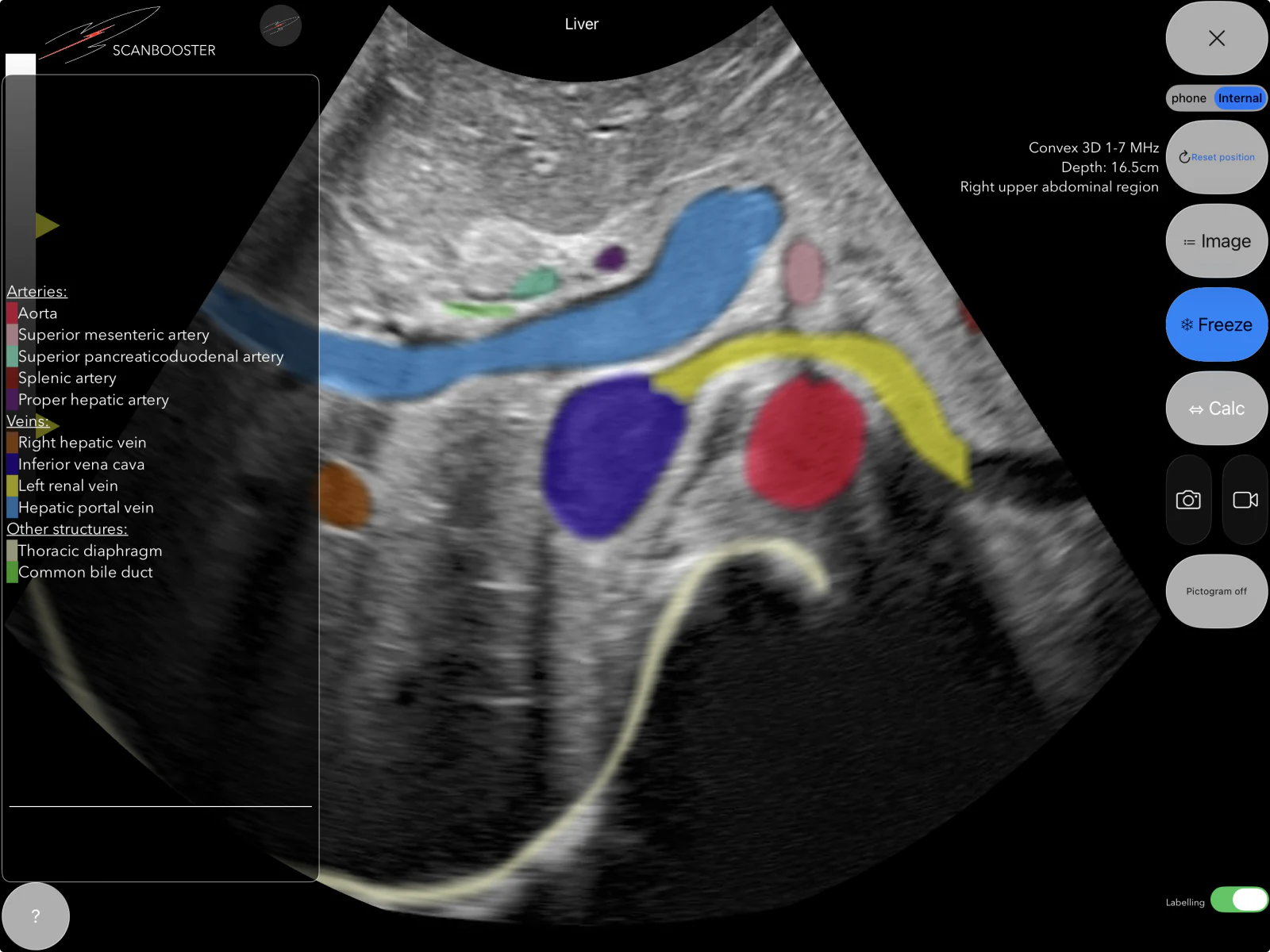
Liver anatomy in the Scanbooster simulator with live labels.
Portal veinAortaBile duct

Learn sonography step by step

What would you like to learn?

Open a chapter, read the explanation and watch the matching part of the ultrasound tutorial. During playback, the open chapter and its understanding question follow the video automatically.

Abdominal ultrasound

Learn liver ultrasound: anatomy, vessels and bile ducts

Learning liver ultrasound means finding your way around the right upper abdomen and identifying vessels by following their course. Ask more than “What is this dark structure?”: where does it come from, where does it lead, and how does its appearance change when the transducer tilts or rotates?

In this tutorial, Jasmin explores a physiological liver case. Scanbooster’s live labels distinguish arterial vessels, the portal vein, hepatic veins and the biliary system. The chapters below turn that examination into a guided sonography lesson with anatomical explanations and practical exercises.

  • Portal vein
  • Hepatic artery
  • Hepatic veins
  • Common bile duct
0:43Find the liver in transverse and longitudinal planes

Find the liver in transverse and longitudinal planes

Start by orienting yourself in the upper abdomen. The tutorial opens the physiological liver case under Internal Medicine → Liver. The position pictogram shows how the current scan plane relates to the body. Transverse and longitudinal sections offer different views of the same organ volume.

Use small fanning, rocking and rotating movements to explore the liver in three dimensions. Follow a structure across adjacent sections rather than naming it from a single still image. Begin with the labels switched on, then find the same structures again without the colour overlay.

Try it yourself

Display the same vessel in two scan planes and compare its appearance with the orientation pictogram.

Check your understanding

Why should you follow the same vessel through several scan planes?

Show the explanation

A single section shows only part of the anatomy. Following a vessel through adjacent planes reveals its course and connections, helping you identify it. The orientation pictogram shows how each plane relates to the body.

1:30Locate the liver beneath the diaphragm

Locate the liver beneath the diaphragm

The liver lies mainly in the right upper abdomen beneath the diaphragm, extending partly into the left upper abdomen. The labelled diaphragm provides a landmark for the upper boundary of the liver and its relationship to the chest.

The liver has important metabolic, synthetic, storage and detoxification functions. For ultrasound orientation, its relationships to vessels and bile ducts are particularly useful. These structures provide landmarks that you can return to as you move through the organ.

Try it yourself

Identify the diaphragm as a boundary of the liver before focusing on individual vessels.

Check your understanding

Which structure helps you identify the upper boundary of the liver?

Show the explanation

The diaphragm lies above the liver and separates the abdomen from the chest. In the tutorial, it provides an orientation landmark before individual vessels are examined.

2:16Trace the aorta, coeliac trunk and hepatic artery

Trace the aorta, coeliac trunk and hepatic artery

The tutorial starts the arterial search at the aorta. From there, it identifies the coeliac trunk and the more caudal superior mesenteric artery. Following the common hepatic artery leads towards the proper hepatic artery, which carries oxygenated blood to the liver.

The video also shows the splenic artery and the origin of the gastroduodenal artery. The proper hepatic artery divides into right and left branches. Use these branching relationships as a route map: a smaller vessel becomes easier to identify when you can trace it back to a larger trunk.

Try it yourself

Follow the sequence aorta → coeliac trunk → common hepatic artery → proper hepatic artery.

Check your understanding

Which vessels form the arterial route from the aorta towards the liver?

Show the explanation

Follow the aorta to the coeliac trunk, then the common hepatic artery and proper hepatic artery. The proper hepatic artery divides into right and left branches supplying the liver.

4:00Recognise the portal vein and its bifurcation

Recognise the portal vein and its bifurcation

The portal vein carries nutrient-rich blood from the unpaired abdominal organs to the liver. It is labelled light blue in the tutorial. At the porta hepatis, it branches towards the right and left liver lobes. Rotating the transducer helps bring this branching pattern into view.

The tutorial compares the bifurcation to a leaping deer. The important skill is to follow the vessel continuously, rather than rely on a memorable shape alone. Distinguish portal venous inflow from hepatic venous outflow: both systems are within the liver, but they have different anatomical connections.

Try it yourself

Follow the main portal vein to its branches, then locate the separate route from the hepatic veins to the vena cava.

Check your understanding

Does the portal vein carry blood towards the liver or away from it?

Show the explanation

It carries nutrient-rich blood from the unpaired abdominal organs towards the liver, branching at the porta hepatis towards the right and left lobes. The hepatic veins provide a separate route for blood leaving the liver.

4:51Find the hepatic veins and inferior vena cava

Find the hepatic veins and inferior vena cava

Blood leaves the liver through the hepatic veins. The right, middle and left hepatic veins drain into the inferior vena cava. Their converging arrangement forms the hepatic venous star shown in the tutorial.

The video uses an oblique upper abdominal plane with approximately 45 degrees of probe rotation. The anatomical connection matters more than a fixed angle. Locate the venous confluence and adjust the plane until you can follow the vessels as they enter the inferior vena cava.

Try it yourself

Identify the right, middle and left hepatic veins, then show the larger vessel into which they drain.

Check your understanding

Which vessels form the hepatic venous confluence, and where do they drain?

Show the explanation

The right, middle and left hepatic veins converge towards the inferior vena cava. This is the hepatic venous star shown in the tutorial. The portal vein bifurcation belongs to a different vascular system.

5:39Identify the gallbladder and common bile duct

Identify the gallbladder and common bile duct

The gallbladder lies beneath the liver and stores and concentrates bile. Its cystic duct joins the common hepatic duct to form the common bile duct, or ductus choledochus. This extrahepatic duct carries bile towards the duodenum.

A bile duct is not immediately visible in every plane. The tutorial starts with the gallbladder, then uses changes in probe angle and rotation to explore the surrounding anatomy. An oblique shoulder-to-umbilicus plane is also discussed. Do not identify a dark tubular structure as a duct solely from its appearance; check its anatomical course.

Try it yourself

Find the gallbladder first, then follow the neighbouring duct and vessel structures through adjacent planes.

Check your understanding

Which two ducts join to form the common bile duct?

Show the explanation

The common hepatic duct joins the cystic duct to form the common bile duct, or ductus choledochus. It carries bile towards the duodenum. The gallbladder connects through the cystic duct.

Gynecological ultrasound

Learn pelvic ultrasound: the uterus and ectopic pregnancy

A systematic pelvic ultrasound examination starts with orientation. Where are the bladder, uterus and ovaries? How are the endometrium and uterine cavity displayed, and what can you see in the adnexa or pouch of Douglas? The tutorial moves from normal anatomy to an abnormal clinical case.

First, explore a normal uterus and unremarkable adnexa in a transabdominal view. Then follow a structured examination in a case suspicious for ectopic pregnancy. The accompanying chapters explain the terminology and show how individual observations contribute to a reasoned ultrasound report.

  • Anteversion / anteflexion
  • Endometrium
  • Adnexa
  • Pouch of Douglas
1:21Orient yourself: bladder, uterus and ovaries

Orient yourself: bladder, uterus and ovaries

The first case shows a normal uterus with unremarkable adnexa. In the transabdominal examination, the filled urinary bladder provides an anterior landmark. The live labels show the relationship between bladder, uterus and the ovaries on either side.

The adnexa include the ovaries and uterine tubes with their associated structures. Practise examining both sides systematically. An overview of normal pelvic anatomy helps you describe the exact location of an abnormal finding later in the examination.

Try it yourself

Display the bladder and uterus together, then locate the right and left ovarian regions.

Check your understanding

Where is the filled bladder in relation to the uterus?

Show the explanation

In the transabdominal view shown, the bladder lies anterior to the uterus and provides an orientation landmark. The ovarian regions are then examined on either side of the uterus.

2:07Recognise anatomy without the labels

Recognise anatomy without the labels

In the examination mode demonstrated in the video, the learner must display a requested structure, freeze the image and mark the structure. This changes the task from recognising a colour overlay to actively finding your way around the ultrasound image.

Use the same principle when you learn sonography: examine a labelled plane, remove the visual help, find the structure again and explain its relationship to adjacent organs. Check your answer only after you have made your own identification.

Try it yourself

Name a structure without the labels and then switch them on to check your answer.

Check your understanding

How can you check that you recognise a structure without its colour label?

Show the explanation

Hide the labels, find and name the structure yourself, and explain its relationship to adjacent organs. Only then switch the labels back on to check your identification.

2:31Uterine position: anteversion, anteflexion and measurements

Uterine position: anteversion, anteflexion and measurements

The abnormal case starts with a systematic assessment of the uterus. The video describes anteversion and anteflexion: these distinguish the inclination of the uterus relative to the vagina from the bend between its body and cervix. They describe orientation and do not automatically indicate pathology.

The uterus is then measured in three dimensions. Reliable measurements require the appropriate scan planes. Practise setting a clean longitudinal or transverse view before placing the measurement points, rather than measuring an oblique section simply because the organ is visible.

Try it yourself

Locate the fundus, body and cervix and decide which scan plane you need for each uterine measurement.

Check your understanding

What is the difference between anteversion and anteflexion?

Show the explanation

Anteversion describes the inclination of the uterus relative to the vagina. Anteflexion describes the bend between the uterine body and cervix. Both terms describe orientation rather than automatically indicating pathology.

3:57Assess the endometrium and uterine cavity

Assess the endometrium and uterine cavity

The tutorial describes a thickened endometrium and measures its thickness. The endometrium is the lining of the uterus. Distinguish it from the surrounding myometrium and relate the measurement to a clearly identified scan plane.

The uterine cavity is then examined systematically. No intrauterine pregnancy is identified in the case shown. This absence alone does not prove ectopic pregnancy: it must be interpreted with the other ultrasound findings, clinical presentation and laboratory results.

Try it yourself

Describe the appearance of the endometrium separately from the question of whether an intrauterine pregnancy is visible.

Check your understanding

Does the absence of a visible intrauterine pregnancy alone prove ectopic pregnancy?

Show the explanation

No. It is an ultrasound finding that must be interpreted with the other scan findings, clinical condition and laboratory results, together with the required further assessment.

4:23Examine the left adnexa and ring-shaped structure

Examine the left adnexa and ring-shaped structure

The examination extends to the left adnexal region. The video identifies an abnormal conglomerate between the left ovary and uterus. Closer inspection reveals a cystic finding with a small ring-shaped structure inside.

Describe the location, relationship to the ovary and internal appearance before drawing a conclusion. Can you find the abnormality again in adjacent sections? A precise description separates what the image actually shows from the diagnostic interpretation.

Try it yourself

Locate the finding relative to the uterus and left ovary and describe its internal structure.

Check your understanding

What should you describe about the abnormality in the left adnexal region?

Show the explanation

Describe its position between the left ovary and uterus, its relationship to the ovary and its cystic appearance with a small ring-shaped structure. Check whether you can find it again in adjacent planes.

4:43Pouch of Douglas and suspicion of ectopic pregnancy

Pouch of Douglas and suspicion of ectopic pregnancy

The case summary combines a thickened endometrium, no visible intrauterine pregnancy, substantial fluid in the pouch of Douglas and an abnormal cystic finding between the left ovary and uterus. The pouch of Douglas lies behind the uterus and is an important location to assess for free fluid.

Together, these findings raise strong suspicion of an ectopic pregnancy in the left uterine tube in this case. An empty uterus or free fluid is not diagnostic on its own. Interpretation requires the overall clinical condition, laboratory findings and appropriately qualified further assessment.

Try it yourself

List the observations first, then state the suspected diagnosis and explain which findings support it.

Check your understanding

Which combination of findings raises suspicion of ectopic pregnancy in this case?

Show the explanation

The case combines a thickened endometrium, no visible intrauterine pregnancy, fluid in the pouch of Douglas and the abnormal left adnexal finding. Individual signs are not conclusive alone; interpretation also requires clinical and laboratory information and further assessment.

Probe handling & scan planes

Learn ultrasound probe movements: fanning, rocking and rotation

An ultrasound image is a section through a three-dimensional body. Fanning, rocking, rotating and translating the transducer change the plane you see. Learn each movement separately and relate it to the resulting anatomical changes on the screen.

The exercise begins with transvaginal handling at 3:29. The following chapters cover rotational and translational movements, followed by simulated contact loss and compression. Select the movement you would like to understand and then practise yourself.

  • Fanning
  • Rocking
  • Rotation
  • Sweeping / sliding
  • Transvaginal
3:29Orient the virtual transvaginal probe

Orient the virtual transvaginal probe

The hand position for a transvaginal case differs from handling a linear or curved transducer on the body surface. The video demonstrates the smartphone’s starting position and alignment before choosing Reset Position. Subsequent movements are interpreted relative to this reference.

Compare your hand position with the pictogram and the displayed pelvic anatomy. Make small, deliberate changes along a single axis. The aim is to connect each change in the image plane with a particular movement rather than alter several axes at the same time.

Try it yourself

Align the virtual transvaginal probe and then change only one movement axis.

Check your understanding

Why do you establish a clear starting position for the virtual probe first?

Show the explanation

The starting position provides a reference for the simulated movements. You can then change one movement axis and relate it to the corresponding change in the pictogram and ultrasound image.

3:44Fanning through adjacent imaging planes

Fanning through adjacent imaging planes

Fanning moves the handle perpendicular to the long axis of the transducer footprint while keeping the contact location fixed. This axis runs from the marked end to the opposite end of the footprint. The beam moves out of the current imaging plane through adjacent sections.

Watch how controlled fanning changes the structures displayed in the tutorial. Practise this movement on its own, keeping the probe location and rotation constant and avoiding additional rocking.

Try it yourself

Fan slowly through the volume and return to the original plane.

Check your understanding

What changes when you fan the probe while keeping its location approximately fixed?

Show the explanation

The beam moves out of the current imaging plane through adjacent sections. The handle moves perpendicular to the long axis of the footprint while the contact location stays fixed.

4:02Rocking to adjust the insonation angle

Rocking to adjust the insonation angle

Rocking moves the handle along the long axis of the transducer footprint, towards its marked or opposite end, while the contact location stays fixed. It redirects the beam within the same imaging plane rather than through adjacent planes.

Use this movement to bring an off-centre structure towards the middle of the image. Start with a small movement and observe the direction in which the structure moves on screen.

Try it yourself

Make a small rocking movement, then bring the same structure back to the centre of the view.

Check your understanding

What distinguishes rocking from fanning?

Show the explanation

Rocking redirects the beam within the same imaging plane. Fanning moves the beam through adjacent imaging planes. Both keep the contact location fixed.

4:11Rotate from a transverse to a sagittal view

Rotate from a transverse to a sagittal view

Rotation turns the transducer around its longitudinal axis. The video demonstrates rotating the smartphone from a transverse orientation towards a sagittal plane. The line in the pictogram helps relate the new scan plane to the body.

An approximately right-angle rotation brings you towards another main anatomical plane when the remaining alignment is appropriate. Try to keep the structure in view as you turn. This connects short- and long-axis appearances of the same anatomy.

Try it yourself

Find a structure transversely, rotate gradually and identify its corresponding longitudinal appearance.

Check your understanding

Around which axis does the probe turn during rotation?

Show the explanation

It turns around its longitudinal axis, changing the orientation of the scan plane. With suitable initial alignment, an approximately right-angle turn changes a transverse view into a longitudinal view.

4:29Sweeping and sliding: translational movements

Sweeping and sliding: translational movements

Translation changes the transducer’s location. In the tutorial’s Swipe mode, up-and-down gestures control one direction while side-to-side gestures control the other. In realScan mode, the smartphone itself moves through space.

Sliding moves the probe along the long axis of its footprint, towards the marked or opposite end. Keep surface contact, angle and rotation unchanged.

Sweeping moves the probe perpendicular to that long axis, across the short axis of the footprint. Move to a new contact location while keeping the angle and rotation unchanged to acquire adjacent imaging planes.

Try it yourself

Compare a pure translation with fanning and describe how the image changes in each case.

Check your understanding

What should you keep approximately constant during a pure translation?

Show the explanation

Keep the probe angle and rotation approximately constant. This mainly changes its location, allowing you to observe the effect of translation on the ultrasound image.

5:09realScan: transfer movements through space

realScan: transfer movements through space

The realScan demonstration begins by initialising the sensors. The tutorial highlights good lighting and a surface with visual contrast. After briefly moving the device to establish its surroundings, the starting orientation is defined with Reset Position.

You can then reproduce the demonstrated translational movements with the smartphone itself. Compare your movement with the changing ultrasound plane. This lesson focuses on transducer handling; use the separate, newer tutorial for device connection instructions.

Try it yourself

Start at a defined reference position, perform a translation and then perform a separate rotation.

Check your understanding

How do you control translational movements in realScan mode?

Show the explanation

After defining the starting position, move the smartphone itself through space. The simulator transfers this movement to the virtual probe. Good lighting and a contrasting surface help establish orientation.

5:47airScan: simulate contact loss and compression

airScan: simulate contact loss and compression

The airScan section extends realScan with vertical movement. Reset Position defines a virtual body surface. Raising the smartphone simulates loss of contact; lowering it restores contact with the virtual surface.

Moving further below the reference surface simulates compression. Distinguish the three states: no contact, contact and pressure on virtual tissue. This section explains the movement logic of the simulator; it is not an instruction to apply pressure during a real transvaginal examination.

Try it yourself

Move deliberately between contact, loss of contact and simulated compression.

Check your understanding

What happens in the simulation when you lift the smartphone above the defined surface?

Show the explanation

The virtual probe loses contact and the simulated image reflects that loss. Lowering the phone restores contact, while moving below the reference surface simulates compression.

Technical setup

Connect Scanbooster Control: use your smartphone as a virtual probe

Scanbooster Control lets your smartphone operate the ultrasound simulation on a tablet. This tutorial focuses on the technical setup: switching from internal to external control, enabling Bluetooth and selecting your phone from the device list.

Use this newer tutorial for the connection process. Probe handling is covered in its own lesson, keeping technical setup separate from the movements used to explore ultrasound anatomy.

  • Bluetooth
  • External control
  • Device list
  • iOS & Android
0:03Choose internal or external control

Choose internal or external control

Internal control uses the movements of the tablet itself. For external control, switch the simulation to the smartphone option. In the iOS example, the selector is at the top right and the option is labelled phone.

This determines which device supplies movements to the simulation. Open Scanbooster Control on the smartphone at the same time. You are setting up a control connection between the apps so the phone can act as the virtual transducer.

Try it yourself

Open a simulation and choose external control through the smartphone.

Check your understanding

Which device provides movement during internal and external control?

Show the explanation

Internal control uses the tablet’s own movement. External control uses the connected smartphone running Scanbooster Control as the virtual transducer.

0:22Enable Bluetooth on both devices

Enable Bluetooth on both devices

In the iOS demonstration, swiping down from the top right opens Control Centre, where Bluetooth is enabled. The tutorial then opens Scanbooster Control on the phone and enables Bluetooth there as well.

Separate Bluetooth availability from pairing: the radio connection must be enabled, but the specific smartphone is selected inside Scanbooster. System interfaces may look different in other operating system versions; the app remains the place to establish the connection.

Try it yourself

Check that Bluetooth is enabled and the appropriate app is open on each device.

Check your understanding

Is enabling Bluetooth on the tablet alone sufficient?

Show the explanation

No. Enable Bluetooth on both the tablet and smartphone, with the appropriate apps open. The smartphone is then selected and connected inside Scanbooster.

0:39Use the device list or proximity connection

Use the device list or proximity connection

When the phone appears in the tablet’s device list, select it. The newer tutorial also demonstrates an automatic connection by bringing the devices closer together. A blue bar indicates proximity until the connection is established.

If several smartphones are available nearby, select the intended device. Once connected, make a small, deliberate movement of the smartphone and check that the simulator’s scan plane responds.

Try it yourself

Select your smartphone and confirm that a small movement changes the simulation.

Check your understanding

How can you check that movement control works after selecting a device?

Show the explanation

Make a small, deliberate movement with the selected smartphone. The simulator’s scan plane should respond. If several devices are available, make sure you have selected the intended phone.

0:59Android: connect through the app

Android: connect through the app

In the Android section, follow the instructions on the smartphone and enable Bluetooth. On the tablet, switch from internal to external control and select the smartphone from the list.

The closing instruction applies to both platforms: use the pairing mechanisms inside the app, rather than pairing the devices in system settings. After connecting, continue with the separate lesson on fanning, rocking and rotation.

Try it yourself

Establish the connection inside the app, then open the probe movements lesson.

Check your understanding

Where do you establish the actual connection between the smartphone and tablet?

Show the explanation

Use the pairing mechanisms or device list inside the Scanbooster app. Enable Bluetooth on each device, but do not establish the pairing through the operating system’s Bluetooth device list.

Learn ultrasound and practise with purpose

How do I learn to orient myself in an ultrasound image?

Begin with a known landmark and follow it through neighbouring planes. Change one probe movement at a time, compare transverse and longitudinal views, and check your identification with the live labels. The liver lessons use the portal vein, hepatic veins and gallbladder as anatomical landmarks.

How can I practise sonography without patients?

Use the Scanbooster ultrasound simulator app to explore physiological and pathological volume datasets. Choose a case, locate a structure and change the plane by moving your device. The practice tasks alongside the videos give you specific steps for independent ultrasound training.

Which ultrasound fundamentals should I learn first?

Connect sectional anatomy with probe handling: how does fanning change the plane, what happens during rotation, and how does translation differ? Then examine an organ systematically, such as the physiological liver, before working through more complex findings such as the ectopic pregnancy case.

Ultrasound practice with Scanbooster

Practise sonography with real ultrasound cases.

Explore the topics from the videos in the Scanbooster ultrasound simulator app. Move your device, change the scanning plane and explore physiological and pathological cases without additional hardware.

The Scanbooster Ultrasound Sim app during a realistic ultrasound exam

The content has been researched with care and reviewed by specialist physicians. These tutorials are intended for medical education and training and do not replace supervised practical training or individual clinical assessment. No guarantee is given as to accuracy, completeness or currency. Applying the information remains your professional responsibility; liability that cannot be excluded by law remains unaffected.

YouTube